

[Dec 21, 2025] NCS-Core certification guide Q&A from Training Expert Actual4Dumps
NCS-Core Certification Overview Latest NCS-Core PDF Dumps
Nutanix NCS-Core Exam Cover Topics
The NCS-100 covers the following topics:
- User Management 18.75%
- Security 15%
- High Availability 15%
- Storage Management 25%
- Disaster Recovery 10%.
NEW QUESTION # 79
A consultant is viewing an ESXi host via console without external network connectivity.
Which two IP addresses can be used to connect to the CVM (Choose two.)
- A. 192.168.5.254
- B. 192.168.5.2
- C. 192.168.5.253
- D. 192.168.5.1
Answer: A,B
NEW QUESTION # 80
Which subnet is reserved for internal connectivity within a Nutanix Cluster?
- A. 192.168.5.0/24
- B. 192.168.5.0/26
- C. 192.168.5.0/23
- D. 192.168.254.0/24
Answer: A
NEW QUESTION # 81
After imaging the nodes and creating the cluster successfully, the consultant connects the cluster to the customer network. When logging into Prism, the events dashboard is full of errors.
What is causing the issue?
- A. Foundation did not create the cluster successfully.
- B. The consultant did not run Nutanix Cluster Check (NCC..
- C. The cluster was not stopped prior to connecting to the customer network.
- D. The Cluster Virtual IP Address (VIP) was not set up during the process.
Answer: C
NEW QUESTION # 82
An administrator is managing multiple Windows and Linux VMs connected to Nutanix Volumes. The Linux VMs are experiencing intermittent connectivity issues. The Windows VMs do not experience the same issue.
Which option should the administrator use to resolve this issue?
- A. Utilize Jumbo Frames
- B. Utilize a separate subnet for the Linux VMs
- C. Set the SCSI timeout value to 60
- D. Add additional disks to the Volume Group
Answer: C
Explanation:
Ref: https://kb.vmware.com/s/article/1009465
NEW QUESTION # 83
Refer to the exhibit.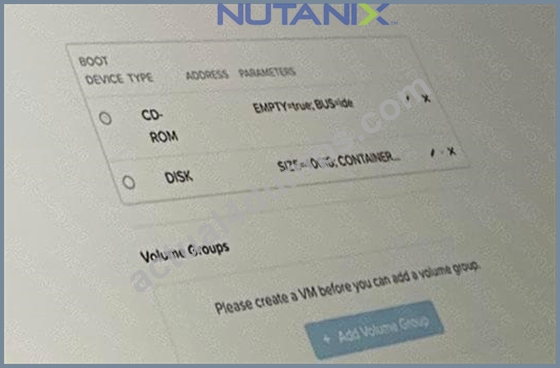
A consultant migrated multiple VMs to a new cluster. VMs were previously in VLAN 10.
Why can the VMs no longer communicate on their network?
- A. The GuestOS firewall is blocking traffic in the new cluster.
- B. The VNIC type should be set to VMXNET2.
- C. Static IP addresses have not been assigned to the new VMs.
- D. The VLAN ID is incorrect.
Answer: D
Explanation:
In scenarios where VMs have been migrated to a new cluster and they were previously on VLAN 10 but can no longer communicate, the most likely cause is that the VLAN ID setting on the virtual network interface cards (VNICs) of the VMs does not match the VLAN configuration of the new network. Ensuring that the VLAN IDs are correctly set to match the network configuration of the new cluster is essential for proper network communication.References:
* Nutanix University - NCS-Core 6.8 Learning Path
* The Nutanix Bible, Networking chapter (https://www.nutanixbible.com/)
NEW QUESTION # 84
An administrator is migrating 5MB shares from a third-party platform to Nutanix Files with the following characteristics:
* Shares contain user profile directories
* DFS-N will be used
How should the administrator create target shares for this migration?
- A. Create standard shares with multiple top-leveldirectories and distribute migrated data.
- B. Create multiple distributed shares and distribute migrated data as evenly as possible.
- C. Create distributed shares with multiple top-level directories and distribute migrated data.
- D. Create multiple general purpose shares and distribute migrated data as evenly as possible.
Answer: C
Explanation:
Explanation
Ref:https://portal.nutanix.com/page/documents/details/?targetId=Files-v3_6:Files-v3_6
NEW QUESTION # 85
A customer has requested that a consultant create a Disaster Recovery Test for their new Nutanix environments.
What should the consultant include in a custom plan to validate VM availability across the network?
- A. Assign backup policies to source VMs.
- B. Verify VMs received correct IP address after failover.
- C. Sign into VM console using local credentials.
- D. Ensure NTP configuration active.
Answer: B
Explanation:
For creating a Disaster Recovery Test plan for Nutanix environments, verifying that VMs receive the correct IP address after a failover is critical to validate VM availability across the network. This check is essential to ensure that network configurations and DHCP/Static IP settings are correctly applied post-failover, enabling proper network communications and access to services hosted on the VMs. Ensuring correct IP addressing is fundamental to the successful operation of DR strategies in virtualized environments.References: Nutanix Disaster Recovery Best Practices, Nutanix Network Configuration for DR environments.
NEW QUESTION # 86
During the knowledge transfer session, a consultant conducts a storage management demo. In the Creating a Storage Container workflow, the customer notices the Advertised Capacity parameter and asks for an explanation.
How should the consultant respond?
- A. It assists in reserving space for a storage container to ensure a minimum storage capacity is available.
- B. It assists in reserving space for a storage container to ensure a maximum storage capacity is available.
- C. It enables the ability to cap usage of storage containers to be smaller than the limit of a storage pool capacity.
- D. It is a capacity computed by dividing physical storage usage of a container by the replication factor (RF).
Answer: C
Explanation:
The "Advertised Capacity" parameter in the context of creating a storage container in Nutanix systems is used to cap the usage of storage containers to be smaller than the limit of a storage pool's capacity. This feature allows administrators to set a maximum storage limit for a container, preventing it from using the entire storage pool's capacity and ensuring that resources are allocated based on planned capacity requirements. This helps in maintaining predictable storage management and allocation within a Nutanix environment.
References: Nutanix Storage Container Management Documentation, Nutanix Best Practices for Storage Configuration.
NEW QUESTION # 87
While trying to upgrade AOS in a cluster, a consultant receives a warning message that there are two powered-on VMs that need to be powered off for the upgrade to proceed.
What would cause this warning to be issued?
- A. Upgrading a single-node cluster requires the VMs to be shut down.
- B. Upgrading a two-node cluster requires the VMs to be shut down.
- C. There are not enough resources left in the single-node cluster.
- D. There are not enough resources left in the two-node cluster.
Answer: B
Explanation:
The warning message about powering off VMs during an AOS upgrade in a two-node cluster is issued because, in smaller clusters such as two-node configurations, resource availability and redundancy are limited.
To safely perform an upgrade without risking service disruption, the VMs need to be powered down to free up resources and ensure that there is sufficient capacity to handle the cluster operations during the upgrade process.References: Nutanix Bible, NCS-Core 6.8 course content, and Nutanix upgrade best practices.
NEW QUESTION # 88
When utilizing the Nutanix cluster As Built Document generator, which two configuration elements should a consultant provide when running the run_as_built.exe command? (Choose two.)
- A. Customer Name
- B. Cluster IP
- C. Data Services IP
- D. Remote Site IP
Answer: A,B
Explanation:
When using the Nutanix cluster As Built Document generator, the necessary configuration elements to provide when running the run_as_built.exe command include the Cluster IP (B) and the Customer Name (D).
The Cluster IP is required to properly identify and communicate with the cluster to gather configuration and operational data. The Customer Name is typically used to personalize the documentation, making it specific to the client's deployment, which is useful for record-keeping and future reference purposes.References: Nutanix As Built Documentation generator usage guidelines, Nutanix Best Practices for Documentation.
NEW QUESTION # 89
Microsegmentation was recently enabled in a Nutanix environment. The administrator wants to leverage Prism Central to create a policy that will block all traffic, regardless of direction, between two groups of VMs identified by their category.
Which policy should be used to meet this requirement?
- A. A Whitehst-Based Policy
- B. An Application Security Policy
- C. A Quarantine Policy
- D. AnIsolation Environment Policy
Answer: D
Explanation: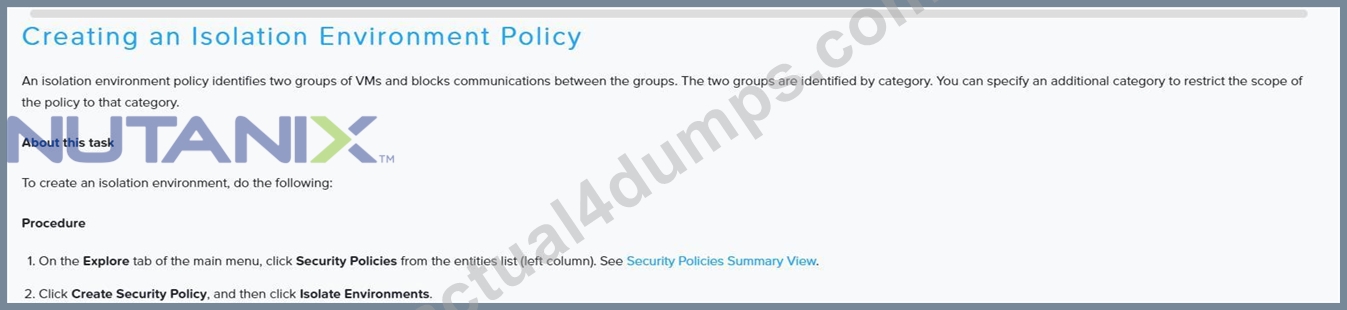
NEW QUESTION # 90
A consultant is reviewing a customers Pre-delivery Questionnaire.
The customer wants to deploy their cluster with ESXi as the hypervisor with vSphere Distributed Switch. The customer will be using Cisco Nexus 9k as their switch choice In the kick-off call, it is confirmed that the customer has a business requirement to use LACP in their environment.
What should the consultant ensure that the customer configures on the port-channel interface before deployment?
- A. service unsupported-transceiver
- B. no lacp graceful-convergence
- C. show pore-channel
- D. no lacp suspend-individual
Answer: D
Explanation:
Given that the customer is using a Cisco Nexus 9k switch and wants to deploy ESXi with a vSphere Distributed Switch while using LACP, the consultant should ensure that the customer configures:
* D. no lacp suspend-individual: This command ensures that LACP doesn't suspend the individual port if it does not receive LACP PDUs from the other side, which is crucial in environments where continuous connectivity is required for all member links of the port-channel to maintain uninterrupted network services.
References:
* Nutanix Bible (https://www.nutanixbible.com), where it discusses ESXi configurations and switch settings.
* Cisco Nexus configuration guides, referred through Nutanix's training materials, which recommend settings for optimal integration with Nutanix environments.
NEW QUESTION # 91
An administrator is using Nutanix Move to migrate a Windows VM from ESXi to AHV. Automated guest preparation is failing with an error:
Account has UAC enabled error
The administrator is using the local built-in administrator account for the Windows VM Admin approval mode must remain enabled.
What should the administrator do to continue with the migration with Nutanix Move?
- A. Use a Domain Admin account for the Windows VM
- B. Place Windows VM in Maintenance Mode
- C. Follow manual VM preparation guidelines
- D. Reboot the Windows VM and try the migration again
Answer: C
Explanation:
https://next.nutanix.com/move-application-migration-19/nutanix-xtract-validation-failed-user-must-belong-in- a-group-with-restore-files-and-directories-security-policy-31303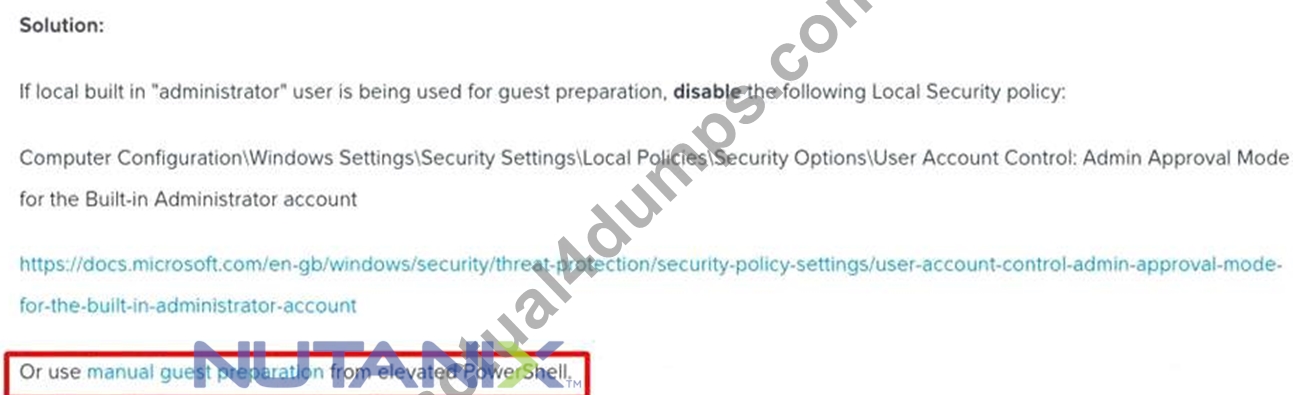
NEW QUESTION # 92
A consultant is planning a new cluster installation and needs to locate the Shared IPMI port for each of the specific nodes that the customer has bought.
Which Support Portal location contains the document that would identify the port?
- A. Knowledge Base
- B. Software Documentation
- C. Hardware Replacement Documentation
- D. Solutions Documentation
Answer: C
NEW QUESTION # 93
A company needs to replicate their VMs to a remote site and must have an RPO of less than 1 hour.
When creating a protection domain, what should an administrator do to meet this requirement?
- A. Enable Near-Sync Replication with an RPO of 15 minutes
- B. Enable Entity Sync on the designated VMs
- C. Enable Async Replication with an RPO of 60 minutes
- D. Enable Availability Zones and send the VM to multiple targets
Answer: C
Explanation:
Ref:
https://portal.nutanix.com/page/documents/details?targetId=Web-Console-Guide-Prism-v5_10:sto-pd-guidelines
NEW QUESTION # 94
A customer has the following requirement for a Nutanix cluster:
* Must support high-performance Nutanix Volumes iSCSI workloads
* Must utilize AHV nodes
* Must use 10 GbE interface
How should the customer optimize networking?
- A. Enable the use of Jumbo Frame on Host and CVM
- B. Convert Cluster to ESXi and enable Jumbo Frame on Host and CVM
- C. Enable Jumbo Frame on just the Host
- D. Enable Jumbo Frames on just the CVM
Answer: A
Explanation:
For high-performance iSCSI workloads, especially in a Nutanix environment using AHV nodes and a 10 GbE interface, enabling Jumbo Frames on both the Host and the Controller Virtual Machine (CVM) is recommended. Jumbo Frames allow for a larger payload per network packet, which reduces the overhead required to send large amounts of data. Enabling Jumbo Frames on both the host and the CVM ensures that both ends of the communication channel can handle larger packets, thereby optimizing throughput and reducing latency for high-performance workloads.
References:
* Nutanix Bible: Networking Best Practices
* Nutanix University: Nutanix Network Optimization
NEW QUESTION # 95
Refer to Exhibit: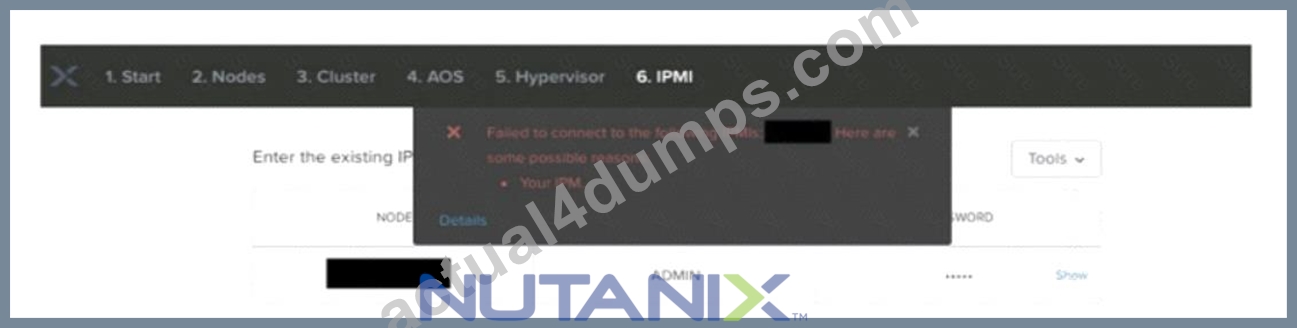
A consultant is conducting cluster deployment using Foundation VM on a laptop.
What troubleshooting step is required?
- A. Confirm that TCP port 5123 is open.
- B. Verify Foundation VM is configured with at least 4GB of memory.
- C. Disable local machine firewall to ensure its not blocking traffic.
- D. Ensure that adaptive endpoint security agents are enabled.
Answer: C
Explanation:
In the scenario where the Foundation VM on a laptop is used for a cluster deployment, and an error indicating a failure to connect to the IPMIs is shown, the first troubleshooting step should be to disable the local machine's firewall to ensure it is not blocking traffic necessary for the Foundation VM to communicate with the IPMIs. Firewalls can often block essential ports or IP addresses needed for deployment operations, hindering the Foundation process.References: Nutanix Foundation Tool Troubleshooting Guide, Nutanix Deployment Common Issues.
NEW QUESTION # 96
Refer to Exhibit: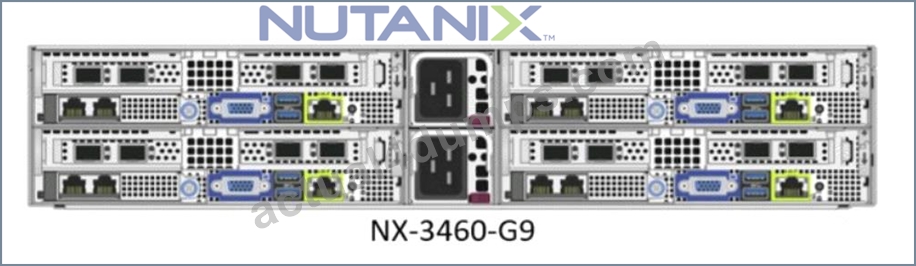
A Foundation install must be done on four NX nodes for a new customer. A consultant need to set up the network onsite before imaging the nodes through the Foundation tool.
The nodes are equipped with two SFP28 25GbE NICs with dual ports, and a 10GBase-T NIC with dual ports as well The customer's ToR switches are 25GbE datacenter switches, already in production.
What is the appropriate hardware to perform the most reliable imaging of these NX nodes?
- A. A flat Ethernet switch. 9 Ethernet cables, and a laptop.
- B. The 25GbE production switches. 4 DAC cables, only one Ethernet cable with a 10GBase-T GBIC, and a laptop.
- C. A flat Ethernet switch, 4 compatible IGBase-T GBiCs, five Ethernet cables and a laptop.
- D. The 25GbE production switches. 4 DAC cables and 5 Ethernet cables with a flat Ethernet switch, and a laptop.
Answer: D
Explanation:
Given that the customer's ToR switches are 25GbE and are already operational, the most reliable and straightforward method for imaging these NX nodes with dual 25GbE and 10GbE ports is to use the 25GbE production switches. The appropriate hardware setup includes:
* 4 DAC (Direct Attach Cable) cables for connecting the 25GbE NICs on the nodes to the ToR switches.
* 5 Ethernet cables to manage connectivity between nodes and potentially to a flat Ethernet switch and a laptop for Foundation process control. This setup ensures the fastest and most reliable network performance during imaging, leveraging the existing high-speed infrastructure.References: Nutanix Hardware and Installation Guide, Best Practices for Network Configuration during Foundation.
NEW QUESTION # 97
A consultant deploys a Nutanix cluster with AOS and ESXi. The cluster is managed by a vCenter server.
After installation, what should the consultant do to ensure the cluster will support network segmentation?
- A. Add another vSwitch to the cluster.
- B. Connect both CVM eth0 and eth2 interfaces to the assigned portgroups.
- C. Manually assign an IP address to the CVM eth2 interface.
- D. Connect both CVM eth0 and eth2 interfaces to vSwitchNutanix.
Answer: B
Explanation:
After deploying a Nutanix cluster with AOS and ESXi managed by a vCenter server, the consultant should ensure that both CVM eth0 and eth2 interfaces are connected to the assigned portgroups on the standard or distributed switch. This setup allows for network segmentation and proper traffic isolation, which is crucial for maintaining network security and efficiency in a virtualized environment.References: Nutanix Bible, Nutanix University NCS-Core 6.8 learning materials
NEW QUESTION # 98
After uploading a hypervisor ISO during the Foundation process, a consultant sees a message that the MD5 sum for the hypervisor is not found in the Whitelist file.
Which step should the consultant take next to resolve this issue?
- A. Check the hypervisor version in the Nutanix Compatibility Matrix.
- B. Download the latest hypervisor ISO whitelist file from Nutanix portal.
- C. Restart the Foundation process and upload the hypervisor again.
- D. Download the hypervisor ISO again from the vendor website.
Answer: B
Explanation:
When a consultant sees a message indicating that the MD5 sum for the hypervisor is not found in the Whitelist file after uploading it during the Foundation process, the appropriate step is to download the latest hypervisor ISO whitelist file from the Nutanix portal (Option C). This file contains the approved checksums for various ISO images, ensuring that the hypervisor ISO being used is verified for compatibility and integrity.References:
Nutanix Foundation Guide, Nutanix Support Portal.
NEW QUESTION # 99
Refer to the exhibit.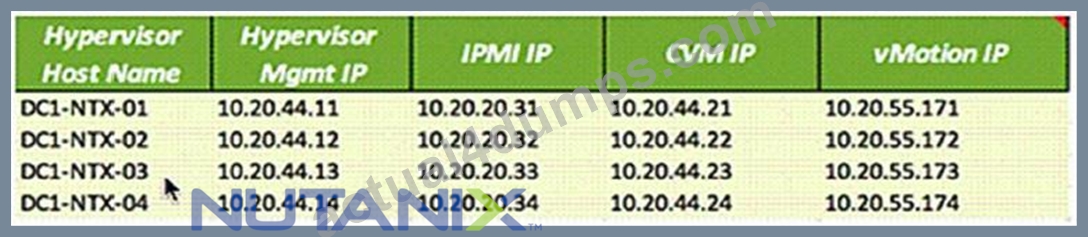
A consultant is deploying a cluster using the customer-provided IP addressing information.
Which option in Foundation must be configured to ensure connectivity during the deployment?
- A. Multi-homing
- B. Network Segmentation
- C. Link Aggregation
- D. Range Autofill
Answer: A
NEW QUESTION # 100
......
The Best Nutanix NCS-Core Study Guides and Dumps of 2025: https://examsboost.actual4dumps.com/NCS-Core-study-material.html